Some of the add-ons were updated today, mostly fixing non-critical issues (these are not bugfixes).
Mobile Layout: for some reason it didn't include my recent updates for the Private Messaging add-on's templates, now they are in the package. An outdated
go.html was removed from the package, default template from basic package should be used. Custom values were swapped in
/templates-mobi/main_posts_cell.html — below follows an explanation.
In
Gender add-on's
bb_plugins.code.txt — default code for
$ret changed. Items were swapped in the
Compiler and
miniBB Demo for its output — now the Gender icon should preferrably appear to the right of Username. Check below for more.
The
Custom Rankings add-on now contains its own CSS and a bit of updated HTML — also all because OF THIS:
During years of development, I have come to the conclusion that all the current Profile-related features miniBB has, i.e. those based on add-ons and solutions, are the final for this project to display on the posts page. Even if something new has to come, at this moment, they have to be arranged properly at least for the full demo and the Compiler's version. Difficulty/goal: evertying should be as compact as possible, no messy, and very dependant on all possible variations. That's what I've worked out today, and it also affected the aforementioned add-ons.
Here're the basic values, which a Profile could have on the posts page, and their default positions from now
on the Desktop template:
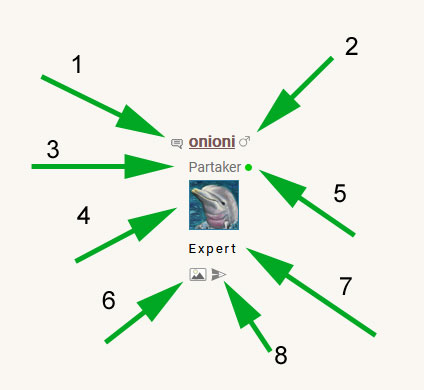
— 1: Poster's icon which is always present;
— 2: Gender icon — could be present or not, and could have 2 different images at least;
— 3: Member's title — it could be default (Guest/Partaker/Admin/Moder
ator), or taken/replaced from $userRanks (bb_specials.php), and it's value also always present;
— 4: if Who's online add-on is installed, and it's allowed by the member to show the online status to others, then this status should appear following the title;
— 5: If an Avatar add-on is installed, the chosen or "empty" avatar image present here;
— 6: If Custom Ranks add-on is installed, the Rank is displayed below the Avatar (or below the Title, if there's no avatar);
— 7: If Photo album is installed, an icon indicating profile's pictures will be present;
— 8: If Private Messaging add-on is installed, an icon indicating Sent-To message feature will be present.
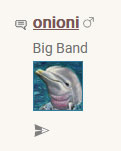
Here's an example of the same profile, which has disabled the Online status view to others, it has a custom title in $userRanks and no Profile pictures present:
For the Mobile view, there's more compact appearance, which doesn't include [6], [7], and [8] from above:
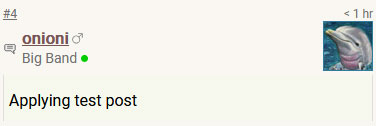
That's why I always recommend to limit Avatars to 50x50 px in size — it's possibly the best size for the compact Mobile look...
Enjoy the changes. More to follow soon!
