miniBB
®Keeping it simple, but not stupid
| miniBB®Keeping it simple, but not stupid |
 Home Home
 Forums Forums
 Demo Demo
 Gallery of Arts Gallery of Arts
 Showcase Showcase
 Features Features
 Requirements Requirements
 Manual Manual
 Download Download
 Compiler Compiler
 Paid Extensions Paid Extensions
 Paid Support Paid Support
 License License
 Contacts Contacts
|
First of all, why it's called "Checker"? Because using it, you are checking all forum topics instantly, and you can't do this without checking the messages out, marking the checkboxes on the form. Additionally, you can organize the list of your very own favorite topics from the forums. By saying you we also mean every member on your forums, specially forum fans, admin and moderators who can't miss a message. How It WorksWhen you enter the Checker, it builds the list of topics from the forums you selected, which contain the messages posted since you have entered the tool for the last time. When checking the topic in such list, you can click on its title and immediately go to the most recent unchecked message, being redirected to the right topic's page and post's anchor. When you do this, the topic opens in a new window. After reading the topic's new messages, close the window and get back to the Checker's list: you will notice the topic you have been just opened, is checked. Finally, when you have went through all topics, click the "Check Out" button. By this you will empty the list, allowing new messages to come in and making sure for the program you are done. 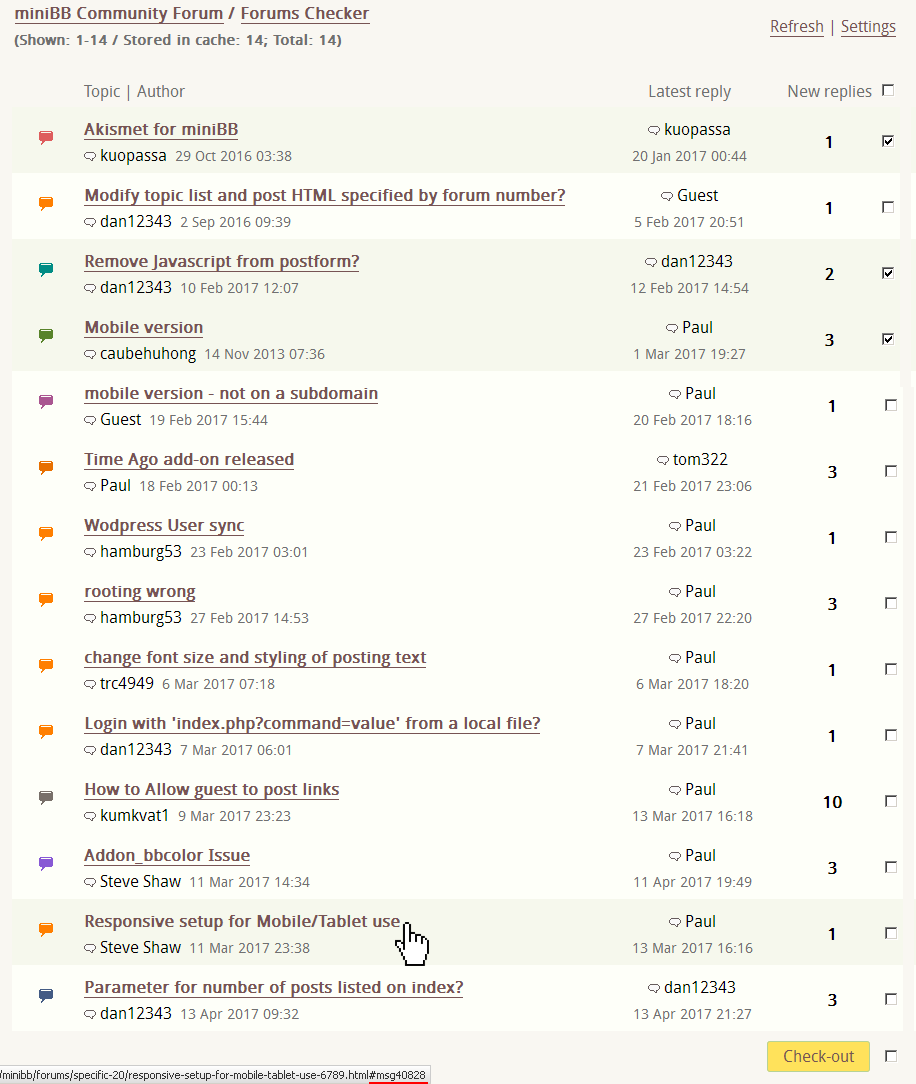
 Screenshot of the miniBB Checker - click for viewing in full size. Pay attention how the Checker will redirect to the first unread message; how it's possible to navigate in results checking the older messages first, and how it's possible to add a topic to Favorites. Screenshot of the miniBB Checker - click for viewing in full size. Pay attention how the Checker will redirect to the first unread message; how it's possible to navigate in results checking the older messages first, and how it's possible to add a topic to Favorites.
Read and think again......about the above written. Don't you agree that "click-n-go" style is much quicker way of checking the messages comparing to what other forum programs suggest? Unread topic icons... AJAX functions which always work on a half... Did they think about the end-users? It must be easy and fast, it must take less server resources, and it must be effective on big forums where you have more than 100 new postings per day. This is what the Checker tool provides: the most effective, branding way of watching any miniBB-based forums. Don't forget to add its URL to your bookmarks - it will make your forums checking a pleasure. Effective SettingsUsing Checker, everybody is allowed to specify certain forums to watch, also as amount of topics displayed in the list. It is also possible to enable "Short Preview" function, which will display parts of the plain content of the unchecked messages presented in the topic, straight in the topics list. That way it's possible to check some topics as quickly as without reading their messages in whole. Checker's functions do not depend on the client side. Its settings and list of topics are saved on the forums server in its own files based storage, which is the fastest implementation method of such task. That way you can check the messages anywhere - while you are traveling, at office, or at Internet-cafe... you don't miss any new reply, never anymore! Checker's configuration for the server sets wide amount of options and limits for professional maintainers, which depend on the size of a community and very own preferences. Each of these options provides a very flexible way of balancing between server costs and usability. Live DemominiBB Community is the right place to check this tool in action. We have programmed and polished it for few years, firstly for ourselves. Now it brings us what was desired: the most affordable and effective support desk, where everything could be watched at a glance in seconds. Anybody else is welcome to try it out, but be afraid to miss this tool in many other forums, after you drive in it! :-) For testing the Checker, you must be registered and logged member. Watch this tool daily and you will see how the new messages are arriving on your desk, and which way you could check them. Read and ask more about the features of this plugin in our related forums topic. Get it NOW!After buying this add-on, you will get a Lifetime license with the possibility to upgrade this add-on for 10 times in the future, if miniBB.com releases the newest versions or patches. It doesn't mean only 10 downloads: you may skip a few releases, and download only something seems to be final. This is a unique offer, and it actually means, you pay once, but get something until it lasts. There are no hidden fees, no monthly fees, no annual fees. You get the editable open source code and are allowed to modify any part of it. However you are not allowed to distribute your copy of the add-on in any way, except using it on your own forums or your own website. Avoiding distribution is in your very own interests; read more why. Click the link below and get this add-on! Forums Checker add-on for miniBB - BUY NOW! (US $5) The sum of the order you see on the screen, is final. No hidden fees or charges will applied to your payment. We cover the transaction fees. After clicking the link above, Forums Checker add-on for miniBB will be automatically added to your Shopping Cart. If you'd like to continue shopping, purchasing another miniBB add-on or License, close the window and get to the page of the product you'd like to buy. In advance, we thank for your support! Each order helps the basic version of miniBB® staying free. Please study all Terms, Conditions and Descriptions below before completing a purchase. Order ContractHere, you will buy from 2Checkout.com. 2Checkout Inc. is an authorized retailer of goods and services provided by miniBB.com. Alternative payment methods are available, contact us privately for more information. Before you start, study the Delivery Policy of our products (Downloadable Goods). After clicking the "Buy Now" link above, you'll be redirected to 2checkout.com page. You'll be asked to enter your Personal (Billing) and Card details. Only Visa and MasterCard are accepted. Choose your currency at the top part of the order page to save on bank conversions. After finishing the order, you should be automatically forwarded back to miniBB.com, this step completes the order. Each order is passing verification process, which usually takes couple of minutes, but for some rare cases could take up to 2 hours. Within this period you certainly should receive the link to your Customer's Download area. The letter would be sent on the email address you provide with the order. Orders are processed automatically. If you didn't get your order information within 24 hours, please contact us! Our Privacy Policy in whole relates to our retailer's Privacy Policy. We take your privacy seriously and will take all measures to protect your personal information. We will not sell or redistribute your information to anyone. Important: we do not have access to your banking information. All your data is securely processed and stored on 2Checkout. We only collect information necessary for your purchase, like email address, transaction IP, name and surname. Your information is used only to verify your purchase, provide access to Premium Downloads, and give an overview of all orders you've made with miniBB. Our Refund Policy in whole relates to our retailer's Refund Policy, and it is possible to issue a refund if you are eligible to clarify that your purchase was done by mistake or occasionally; in that case please contact us, or 2Checkout support immediately. We are giving 100% warranty, that our software works as proposed, if installed properly and plugged-in with the latest supported version of miniBB; and the package files do not contain trojans, spyware or viruses. After we completed the sale granting the access to the protected downloads area, we keep all rights to not issue a refund. That's why we appreciate any of your questions, suggestions and comments before you buy. If there is something specific about your order we should know about, please do not hesitate to contact us first. You can fully test online anything you buy and request additional information from us for free. If you ignore our statements, program descriptions, consultation service, the working principles of the software you ordered, or if you buy without knowing what your order is about, it is not the subject to refund the order. An automated system is used for completing the orders. That's why, in some rare cases, your email server may deny automatically-sent message. If you have made a successful purchase, but didn't receive the information about your order within 24 hours, at first check your bulk or spam folders. If the email is not moved there - contact us privately, providing your order number. Order information will be re-verified by us and sent to you manually. |
 Forum owners about miniBB: Forum owners about miniBB:Great Forums. I got it up and running in no time at all. Its got all the features You need and none of the extra crap that just causes headaches anyways...  GeOgeL GeOgeL |
 |
miniBB.com © 2001-2026. All rights reserved. miniBB® is a registered trademark. @ Contact Us |